Best Phones for Elderly UK (2026) | Doro & Emporia on Co-op
Your Co-op Mobile · Doro & Emporia Phones
The Best Simple Phones for Elderly People on Pay Monthly Plans
Big buttons, loud & clear sound, SOS emergency buttons, and ethically-backed contracts — all through the UK's most trusted co-operative network.
✅ No tech expertise needed ✅ SOS emergency button on every phone ✅ Hearing aid compatible ✅ Ethical Co-op network ✅ Flexible pay monthly plans Best Phones for Elderly UK -Buyer's Guide · 2026
Why Finding the Right Phone for an Elderly Loved One Really Matters
Choosing a mobile phone for an older parent or grandparent isn't just about picking the cheapest deal on the shelf. The wrong handset — one that's too complicated, too small-screened, or too hard to hear — often ends up sitting unused in a drawer. That's a missed opportunity for connection, safety, and independence.
The good news is that a new generation of phones designed specifically for seniors has transformed what's possible. Brands like Doro and Emporia have spent years listening to older users and their families, building handsets with genuinely large buttons, amplified loudspeakers, hearing aid compatibility, and — crucially — a dedicated emergency SOS button that sends GPS location to family members with a single press.
Even better, you don't have to buy these phones outright. Your Co-op Mobile offers a range of pay monthly contracts that spread the cost affordably while running on a reliable UK network. As a co-operative, any profit goes back to members and the community — so you're doing something good while getting a great deal.
In this guide we cover every Doro and Emporia phone currently available on Your Co-op Mobile's pay monthly plans — what each one does, who it suits best, and exactly how to get it. Whether you're shopping for yourself or helping a parent or grandparent get connected, we've got you covered.
Browse All Pay Monthly Phones →Why Your Co-op Mobile
A Network That Actually Cares About Its Customers
Your Co-op Mobile isn't your typical mobile network. As part of the co-operative movement, it operates differently from the big four operators — profits are reinvested into the business and the community rather than paid out to shareholders. That means straightforward pricing, no nasty surprises, and a customer service culture built on genuine helpfulness rather than upselling.
For families looking for a simple, trustworthy phone contract for an older relative, that ethos matters enormously. The plans available are flexible, transparent, and — perhaps most importantly for seniors — genuinely uncomplicated to understand.
Co-operative Values
Profits reinvested into members and community, not shareholders. A network you can feel good about.
Flexible Pay Monthly
Spread the cost of your phone over affordable monthly payments with no large upfront expense.
Ethical & Sustainable
Committed to sustainability and stocking eco-conscious brands like Fairphone alongside Doro and Emporia.
UK Customer Support
Friendly, genuine support for customers who need a little extra help getting set up or troubleshooting.
Phone #1 · Doro
Doro 8100 — The Reliable All-Rounder
"Easy to use. Easy to love." — Doro's own tagline, and customers agree.
The Doro 8100 is arguably the most popular senior smartphone in the UK, and for good reason. It strikes an excellent balance between modern smartphone functionality and genuine ease of use. The 6.1-inch HD screen is bright and large enough to read comfortably without squinting, and Doro's EVA interface — standing for "Easy, Friendly and for Everyone" — replaces the cluttered app grid you'd find on a standard Android phone with large, clearly labelled icons and simplified menus.
Perhaps the standout feature is the Response by Doro emergency button on the back of the handset. One press alerts your pre-selected contacts through the free Response by Doro app, sends them your GPS location, and automatically connects a voice call on speakerphone. For anyone who lives alone or has health concerns, this is an enormous source of reassurance — for both the user and their family.
The triple camera system (13MP main, plus portrait and macro lenses) is genuinely capable for capturing memories and video calling grandchildren. Sound quality is exceptional too, with HD Voice, hearing aid compatibility (HAC), and boosted volume levels so calls are always clear even in noisy environments.
One particularly thoughtful feature is the pre-installed TeamViewer Quick Support app, which lets a trusted family member or carer take temporary remote control of the phone from their own device — anywhere in the world. Perfect for helping with setup, installing apps, or troubleshooting, without anyone having to drive across town.
- Large 6.1" bright HD screen with big icons
- Response by Doro emergency SOS button with GPS
- TeamViewer remote support for family members
- Triple camera with portrait & macro modes
- HD Voice & hearing aid compatible (HAC)
- IP54 splash & dust resistant
- NFC contactless payments
- Step-by-step setup guide included on first use
- Google Assistant built in
- 4G fast mobile data
Phone #2 · Doro Aurora Series
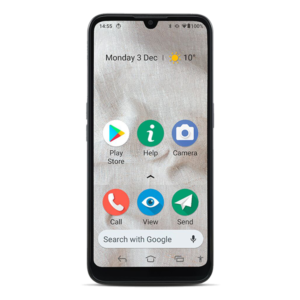
Doro Aurora A10 New 2025
The compact Aurora — big on features, small enough to slip in any pocket.
The Doro Aurora A10 is the entry point into Doro's brand new Aurora range — announced in 2025 and already receiving strong praise as one of the most thoughtfully designed senior smartphones ever made. If you're looking for a compact, lightweight handset that fits neatly in a pocket or small handbag without compromising on safety features, this is the one.
At 4.5 inches, the screen is noticeably more manageable in the hand than larger phones — and that's by design. Research conducted by Doro found that 51% of seniors worry about pressing the wrong thing on their device, and 49% struggle with app navigation. The A10 addresses both concerns head-on with its Doro Easy Interface: clear menus, large icons, and three dedicated physical buttons for easy calling, so there's never any confusion about which button does what.
The Doro Secure button is the Aurora's answer to the SOS emergency feature. One touch sends an alert — including GPS location — to your chosen contacts, even if the phone is on Do Not Disturb. The TeamViewer remote support is also built in, letting a trusted relative assist with the phone from their own device without needing to be in the same room.
Sound quality is powered by Doro ClearSound technology, which optimises audio for clarity and is hearing aid compatible. The impressive battery life — up to 384 hours on standby and 21 hours talk time — means seniors won't be constantly hunting for a charger. The A10 also supports wireless charging with the optional Doro Aurora charging stand, which doubles as a hands-free video calling station.
The Aurora range is also built with recycled materials, making it a great choice for those who want an ethically-minded phone that aligns with Your Co-op's sustainability values.
- Compact 4.5" display, easy to grip
- Doro Secure emergency button with GPS
- Doro Easy Interface — simplified menus
- 3 dedicated physical call buttons
- Doro ClearSound for hearing clarity
- TeamViewer remote family support
- Wireless charging compatible
- Up to 384h standby / 21h talk time
- Google Gemini voice assistant
- Eco-friendly recycled materials build
Phone #3 · Doro Aurora Series
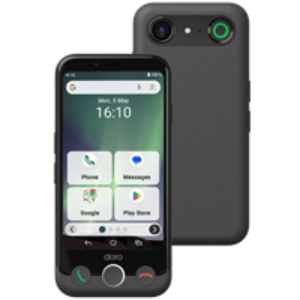
Doro Aurora A20 New 2025
Touchscreen convenience meets the reassurance of physical keys — the best of both worlds.
The Doro Aurora A20 is the most distinctive phone in the Aurora range — and quite possibly the cleverest. It features the same 4.5-inch touchscreen as the A10, but adds a flip-down physical number keypad that slides out from the bottom of the device. This makes it perfect for people who love the idea of a smartphone but feel more comfortable actually dialling with proper buttons they can feel.
This hybrid approach is exceptionally well thought through. Many seniors grew up with traditional handsets and find touchscreen-only dialling fiddly or anxiety-inducing. The A20 removes that barrier entirely. When you want to call someone, flip out the keypad and dial in the traditional way. For browsing, apps, or messaging, use the touchscreen as you would on any modern smartphone.
Everything else that makes the Aurora range exceptional is present here too. The Doro Secure emergency button sends GPS location to contacts at a single press. Doro ClearSound technology ensures crystal-clear calls with full hearing aid compatibility. The Doro Easy Interface keeps the screen uncluttered and navigation simple. And TeamViewer remote support means your family can help you out without needing to be in the room.
The A20 is made with recycled materials and supports wireless charging — and like all Aurora phones, it ships with a USB cable included so you can get started right away.
- 4.5" touchscreen PLUS physical flip keypad
- Ideal for traditional diallers transitioning to smartphones
- Doro Secure emergency SOS button with GPS
- Doro Easy simplified interface
- Doro ClearSound + hearing aid compatible
- TeamViewer remote support
- Wireless charging compatible
- 3 dedicated physical call buttons
- Google Gemini voice assistant
- Eco-friendly recycled build
Phone #4 · Doro Aurora Series
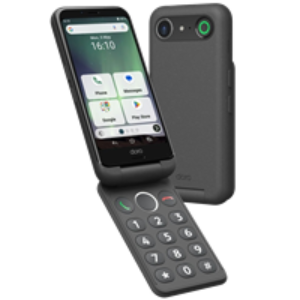
Doro Aurora A30 New 2025Premium Pick
The flagship Aurora — a large, vivid screen and Doro's best-ever camera for seniors who want more.
If you want the absolute best that Doro offers in the Aurora range, the Doro Aurora A30 is it. This is the top-of-the-line Aurora model, packing a large 6.1-inch display and Doro's most impressive camera to date — a 50MP main sensor, compared to the 13MP found on the A10 and A20. For seniors who love photography, video calling, or simply want the clearest possible pictures of grandchildren and family events, the A30 delivers in a way no Doro before it has managed.
The larger screen is particularly valuable for those with any degree of vision impairment. Text, icons, and images are displayed with much greater clarity than on smaller handsets, and the Doro Easy Interface ensures that despite the larger canvas, nothing feels cluttered or confusing. Everything is exactly where you expect it to be.
The A30 comes with the Doro Aurora wireless charging stand included in the box — a thoughtful addition that doubles as a hands-free video calling station. Set it on the kitchen counter or bedside table, and the phone charges effortlessly without fiddling with cables. The stand has a built-in dimmable light so it's easy to see in low-light conditions at night, too.
Safety features are the same class-leading standard as across the Aurora range: the Doro Secure button sends GPS alerts to contacts even with Do Not Disturb active, TeamViewer lets family members provide remote support, and Doro ClearSound with full hearing aid compatibility keeps every call crystal clear.
The A30 is crafted with recycled materials — in line with both Doro's sustainability commitments and Your Co-op Mobile's ethical ethos. If you're buying for someone who deserves the best, this is the phone to choose.
- Large 6.1" display for comfortable viewing
- 50MP camera — Doro's very best
- Wireless charging stand included in box
- Doro Secure SOS button with GPS alert
- Works even when Do Not Disturb is on
- Doro Easy Interface — uncluttered menus
- Doro ClearSound + hearing aid compatible
- TeamViewer remote support for family
- Eco-friendly recycled materials
- Google Gemini voice assistant
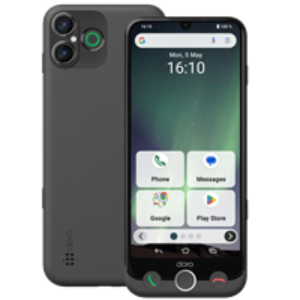
Phone #5 · Emporia
Emporia ME6 5G · Dual Mode
The phone that grows with you — senior-friendly simplicity and full Android power in one handset.
The Emporia ME6 is unlike any other phone on this list — and that's very much a compliment. Where the Doro range focuses entirely on the senior experience from the ground up, Emporia has taken a different approach with the ME6: a full-power 5G Android smartphone with the option to switch into a simplified senior-friendly mode whenever you want. Two phones in one.
Standard Android Mode
Full Android 13 experience — all your apps, customisation, and features exactly as on any mainstream smartphone.
Easy Mode (2 button presses)
Simplified tile-based interface with essentials only: calls, messages, email, internet. Perfect for less confident users.
This switchable interface is genuinely brilliant for families. The ME6 can be handed to an older parent already set up in Easy Mode — with the simplified tile layout showing only phone, messages, email, and the internet — and they need never know the full Android experience exists. But if they gain confidence, or if they want to use a particular app, switching back takes just two button presses. No factory reset, no new phone needed.
The hardware is exceptional by any standard. The massive 6.58-inch Full HD+ display is among the largest screens on this list, making everything beautifully easy to see. The triple rear camera is led by a 50MP main sensor with solid low-light performance — and the 8MP selfie camera is perfect for video calls with family. A powerful 4,900 mAh battery means the phone will comfortably last a full day or more even with regular use.
The dedicated emergency button on the back can be programmed to call chosen contacts immediately — or reprogrammed as a quick-access shortcut to the camera or any other function. The fingerprint reader built into the power button makes unlocking effortless, and NFC enables contactless payments at any card reader — useful when you'd rather not fumble for your wallet.
The Emporia ME6 also features ASHA Bluetooth, the specialist protocol that gives the highest quality audio for hearing aid users — significantly better than standard Bluetooth in this regard. For anyone relying on hearing aids, this is a meaningful advantage over many competitors.
- 5G ready — future-proofed connectivity
- Switchable Easy Mode (2 presses to switch)
- Enormous 6.58" Full HD+ display
- 50MP triple rear camera
- 4,900 mAh long-life battery
- Emergency panic button with 999 speed-dial
- ASHA Bluetooth for hearing aid users
- NFC contactless payments
- Fingerprint reader on power button
- 128GB storage + microSD expansion
Side-by-Side Comparison
Which Phone Is Right for You? Quick Comparison
Not sure which handset to choose? This table cuts through the detail so you can pick the right phone at a glance.
| Phone | Screen | Camera | SOS Button | 5G | Physical Keys | Best For |
|---|---|---|---|---|---|---|
| Doro 8100 | 6.1" HD | 13MP Triple | ✓ Response by Doro | ✗ 4G | ✗ | Proven reliability, first smartphone |
| Aurora A10 | 4.5" LCD | 13MP | ✓ Doro Secure | ✗ 4G | ✓ 3 call buttons | Compact & pocket-friendly |
| Aurora A20 | 4.5" + Keypad | 13MP | ✓ Doro Secure | ✗ 4G | ✓ Flip keypad + 3 buttons | Touchscreen + traditional dialling |
| Aurora A30 | 6.1" Large | 50MP | ✓ Doro Secure | ✗ 4G | ✓ 3 call buttons | Vision concerns, photography lovers |
| Emporia ME6 | 6.58" Full HD+ | 50MP Triple | ✓ Panic Button | ✓ 5G | ✗ | Tech-aware, 5G future-proofing |
Buyer's Guide
How to Choose the Best Senior Phone: What Really Matters
Buying a phone for an elderly relative can feel overwhelming when you're faced with dozens of models and unfamiliar specifications. But when it comes to senior phones, a handful of features really do make the difference between a handset that gets used every day and one that sits in a drawer. Here's what to look for.
1. The Emergency SOS Button — Non-Negotiable
Every phone on this page includes some form of emergency button, and this should be considered essential for any senior living alone or with health conditions. Look for a system that not only makes a call but also sends GPS location to family members — the Doro Response system and Doro Secure button both do this, as does the Emporia panic button. This single feature gives both the user and their family enormous peace of mind.
2. Screen Size and Icon Clarity
Many people over 70 have some degree of age-related vision change, even if they don't consider themselves to have poor eyesight. A larger screen with large, clearly labelled icons (not just tiny symbols) makes an enormous practical difference. The Doro 8100, Aurora A30, and Emporia ME6 all have screens over 6 inches for maximum readability.
3. Hearing Aid Compatibility and Call Volume
Standard Bluetooth can cause interference with hearing aids. Phones rated for hearing aid compatibility (HAC) are engineered to minimise this. The Emporia ME6 goes further with ASHA Bluetooth support — the gold standard for hearing aid audio streaming. All Doro phones in this guide are HAC-rated with boosted speaker volumes for clearer calls.
4. Remote Support for Family Members
TeamViewer Quick Support, pre-installed on all Doro phones in this guide, is one of the most practical features ever added to a senior handset. It allows a family member to take temporary remote control of the phone from their own device — updating settings, downloading apps, or solving problems — without having to travel across town. If your elderly relative needs regular tech help, this feature alone could save hours of frustration.
5. Battery Life
A phone that dies by mid-afternoon is a safety risk, not just an inconvenience. Look for standby times of at least a day. The Emporia ME6's 4,900 mAh battery is a highlight here. The Doro Aurora A10 offers up to 384 hours standby and 21 hours talk time — more than enough for even the most talkative senior.
Tips for Setting Up a Senior Phone
Set up the emergency contacts first
Before anything else, programme the SOS button with at least two trusted contacts. Test it works before handing the phone over.
Enable TeamViewer from the start
On Doro phones, set up TeamViewer access during initial setup so you're ready to help remotely whenever needed.
Adjust font and icon size
Most senior phones support adjustable text sizes. Set these to maximum during setup — your relative can always reduce them later.
Put the important contacts on speed dial
Add family members as favourites so they appear on the home screen. The fewer steps to make a call, the better.
Label the phone case
A small sticker on the back with the owner's name and a family contact number is invaluable if the phone is ever lost.
Walk them through it in person first
Spend an hour together exploring the phone. Familiarity reduces anxiety and means they're more likely to actually use it.
Frequently Asked Questions
Final Thoughts
Ready to Find the Perfect Phone for Your Elderly Loved One?
Staying connected as we age shouldn't be a struggle, and it doesn't have to be. The phones available through Your Co-op Mobile's pay monthly plans represent the very best that senior mobile technology has to offer right now — from the trusted Doro 8100 to the brand-new Aurora range, and the impressively versatile Emporia ME6.
Every single phone on this page includes an emergency SOS button with GPS location sharing, hearing aid compatibility, and a simplified interface designed to make daily use genuinely enjoyable rather than stressful. Paired with Your Co-op's ethical, flexible pay monthly plans, there's truly something here for every need and every budget.
Here's a quick summary to help you decide:
Doro 8100
The proven, reliable all-rounder. Perfect for first-time smartphone users who want simplicity they can trust.
View Deal →Doro Aurora A10
New for 2025. Compact and light — the best Aurora for smaller hands or those wanting something pocket-friendly.
View Deal →Doro Aurora A20
New for 2025. Touchscreen plus a physical flip keypad — the ideal bridge between traditional and modern phones.
View Deal →Doro Aurora A30
New for 2025. The premium pick — large screen, 50MP camera, wireless charging stand included. Worth every penny.
View Deal →Emporia ME6
The 5G powerhouse with dual simple/standard modes. For tech-aware seniors or families wanting future-proof flexibility.
View Deal →See All Phones & Current Deals
Browse the full range of Doro and senior-friendly phones on Your Co-op Mobile's pay monthly plans — prices and availability updated regularly.
View All Pay Monthly Phones →Disclosure: This article contains affiliate links. If you click through and make a purchase, we may earn a small commission at no extra cost to you. This helps support the running of this site. All opinions expressed are our own and based on research. Prices and plan details are subject to change — always check the retailer's website for the most current information.